Category Archives: Uncategorized

Managed Capacity Vs. Managed Services: Understanding The Distinction

Managed Capacity Vs. Managed Services: Understanding The Distinction

In today’s fast-changing business environment, companies face constant challenges when it comes to managing their IT needs. Technology drives productivity, security, and innovation, yet many organizations still struggle with finding the right support structure. The debate between managed capacity vs. managed IT services has become central to decision-makers evaluating how best to handle their IT investments.

At first glance, these models may seem similar. Both allow businesses to rely on external expertise, reduce in-house overhead, and focus on core operations. Yet the real differences lie in how each model approaches control, cost, scalability, and long-term value. For some, managed capacity delivers short-term flexibility and direct oversight. For others, managed services create an ongoing, proactive relationship designed to improve operations over time. Understanding these distinctions helps businesses select the model that aligns with their vision for growth.

What Is Managed Capacity?

Managed capacity is a model designed to give companies flexible access to skilled IT resources. Instead of hiring permanent staff, organizations rent capacity for specific projects, peak workloads, or transitional periods. This approach is particularly popular for businesses facing temporary skill gaps, seasonal demand, or urgent short-term projects.

One of the defining aspects of managed capacity is control. Internal teams maintain full oversight of strategy, execution, and daily work while external resources are integrated as additional support. It is like expanding the bench with players ready to step in when needed, without the long-term cost of keeping them on payroll.

The financial model reflects this flexibility. Costs are typically tied to hours worked or resources consumed, creating variability in the budget. While this can be cost-effective for immediate needs, it may lead to unpredictability when demand spikes. Organizations must balance the benefits of rapid scalability with the reality of fluctuating expenses.

Managed capacity works well in environments where speed and adaptability are priorities. For example, a company launching a new product might require specialized developers for six months. Instead of committing to permanent hires, they can secure managed capacity resources to cover that period. Once the project concludes, the contract ends and costs are reduced accordingly.

What Are Managed Services?

Managed services represent a different philosophy. Instead of filling gaps on a temporary basis, this model focuses on long-term partnership. Businesses entrust an external provider to handle critical IT functions such as network monitoring, cybersecurity, disaster recovery, remote help desk, and ongoing maintenance.

The defining feature is proactivity. With managed services, the provider continuously monitors systems, identifies risks, and prevents problems before they cause disruption. This approach contrasts with reactive support, where issues are addressed only after they occur. Clients benefit from peace of mind knowing that their IT environment is under constant oversight.

The financial model is also distinct. Costs are predictable, typically structured as a monthly subscription. This stability allows businesses to budget effectively, avoiding the volatility associated with hourly billing or fluctuating project demands. Predictability is often one of the main reasons companies lean toward managed services when evaluating capacity services vs. managed services.

Perhaps the most valuable element is strategic alignment. Providers often assign a virtual Chief Information Officer who works closely with leadership to design technology roadmaps, guide investment decisions, and align IT with long-term business goals. This transforms the relationship from a vendor-client interaction to a collaborative partnership.

Key Distinctions Between Managed Capacity and Managed Services

The two models differ in fundamental ways that affect business outcomes.

Control versus delegation is the first key distinction. Managed capacity places control squarely in the hands of the client. The external team supplements existing staff but does not assume ownership of outcomes. Managed services shift responsibility to the provider, who becomes accountable for performance and results.

Cost variability versus predictability is another. Managed capacity expenses fluctuate based on demand, which can complicate long-term planning. Managed services offer consistent pricing, enabling companies to manage budgets with greater confidence.

Short-term versus long-term also defines the difference. Managed capacity is ideal for projects, transitions, or temporary needs. Managed services are designed for continuity, resilience, and strategic growth.

Reactive versus proactive is the final distinction. Managed capacity tends to respond to immediate needs. Managed services anticipate risks and address them before they escalate into major issues.

These differences are not merely academic. They determine how businesses experience IT support, how stable their operations remain, and how well technology contributes to broader objectives.

Why Choose Managed Services for Growth

The decision to choose managed services often comes down to more than cost. Businesses looking to scale sustainably require more than temporary fixes. Managed services provide the structure, expertise, and foresight that enable growth without the constant cycle of troubleshooting.

With 24/7 monitoring, businesses gain uninterrupted oversight of their networks and systems. Cybersecurity threats are detected early, downtime is minimized, and recovery strategies are ready if disaster strikes. Instead of assigning internal staff to reactive support, leadership can focus on driving innovation, confident that IT operations are secure and reliable.

Additionally, strategic guidance through dedicated vCIO support empowers businesses to invest wisely. Technology is no longer just a supporting function; it becomes an enabler of new opportunities. The proactive model creates an IT environment that adapts as the business evolves, instead of constantly playing catch-up.

In comparison, managed capacity may address an immediate project need but does not deliver ongoing protection or guidance. Once the project ends, so does the support. For organizations looking to thrive in highly competitive markets, continuity and long-term alignment often outweigh short-term flexibility.

When Managed Capacity Is the Right Choice

Despite the advantages of managed services, managed capacity has its place. Certain industries or projects benefit from temporary boosts in expertise. A construction firm that plans to digitize project records may need extra support during the transition but not afterward. A healthcare organization implementing a new compliance system may require specialists for six months or less.

Managed capacity shines in scenarios where agility is paramount and long-term dependency is unnecessary. Businesses retain full control while still benefiting from external skills. The model works best when goals are clearly defined, timeframes are short, and oversight is readily available in-house.

How Businesses Can Decide Between the Two

The decision between managed capacity and managed services depends on more than IT alone. Leaders must consider the overall business context, internal resources, and long-term goals.

If your organization has strong in-house IT leadership and only needs short bursts of support, managed capacity may fit the bill. However, if your team is stretched thin, if cybersecurity concerns are mounting, or if you want IT to serve as a long-term growth driver, managed services create a more sustainable path.

Ultimately, the distinction lies in strategy. Managed capacity solves immediate issues but leaves the long-term direction to the client. Managed services assume responsibility for the health and strategy of IT, creating a partnership that grows with your business.

The Role Of Proactivity In Modern IT

One of the biggest shifts in the technology world is the transition from reactive to proactive management. Businesses can no longer afford to wait for downtime, breaches, or system failures before taking action. The cost of disruption is too high, and the pace of innovation too fast.

This is where managed services deliver unmatched value. Continuous monitoring identifies patterns, predicts risks, and strengthens resilience before problems escalate. Proactivity not only saves money but also protects reputation, compliance, and customer trust. Managed capacity, while useful, does not carry this proactive focus.

Making the Distinction Clear

When comparing managed capacity vs. managed services, the core difference is perspective. One model emphasizes filling gaps and retaining control. The other emphasizes long-term partnership, stability, and foresight. Both models have merit, but they serve different purposes.

Businesses that recognize the importance of uninterrupted IT support, strategic planning, and consistent budgets often gravitate toward managed services. Those with immediate project needs and strong in-house leadership may prefer the flexibility of managed capacity. The key is aligning the model with business goals, not just technology requirements.

Partnering with Metis Technology

At Metis Technology, we understand that no two businesses face the same IT challenges. Some require immediate support to complete a project, while others need long-term guidance to achieve growth. Our managed services are designed to create a stress-free IT experience, combining 24/7 monitoring, dedicated vCIO support, and comprehensive solutions that scale with your business.

We see ourselves as more than a vendor. We are a partner in your success, focused on aligning technology with your goals. By taking on the responsibility of monitoring, securing, and guiding your IT operations, we free your team to focus on what matters most: running and growing your business.


8 IT Outsourcing Trends Impacting Small And Large Businesses

8 IT Outsourcing Trends Impacting Small And Large Businesses

The rapid evolution of technology continues to reshape how organizations operate, adapt, and grow. Both small businesses and large enterprises are leveraging IT outsourcing more than ever to stay competitive, scale efficiently, and manage costs without sacrificing quality. By understanding the most relevant IT outsourcing trends, companies can make informed decisions when working with IT outsourcing companies and gain a long-term edge in their industry.

From Vendors to Strategic Partners

One of the most significant shifts in outsourcing is the transition from transactional vendor relationships to collaborative partnerships. Companies are no longer satisfied with IT outsourcing companies that only complete tasks on demand. They want a partner who understands the bigger picture, aligns with their objectives, and brings strategic insights to the table.

This change reflects the growing complexity of technology and the need for more than just technical execution. Small businesses often lack internal IT leadership, so they rely on outsourcing partners for guidance on growth, planning, and efficient technology use. Larger enterprises face their own challenges, such as managing global operations and integrating diverse systems. For them, an outsourcing partner must have the ability to create tailored strategies that work across borders and meet high compliance standards.

When outsourcing relationships move beyond short-term projects, businesses experience more consistent results. A trusted partner builds continuity into IT operations, strengthens trust between teams, and fosters innovation that extends across the entire organization. Instead of reacting to issues, these partnerships focus on planning, improving, and adapting to future needs.

The Influence of Artificial Intelligence and Machine Learning

Artificial intelligence (AI) and machine learning (ML) are no longer optional tools. They are actively transforming IT outsourcing. Service providers use AI to analyze data, automate support, predict risks, and improve response times. For example, predictive analytics helps companies foresee system failures before they occur, allowing for proactive maintenance.

AI also plays a role in customer service through chatbots and virtual assistants. These tools help small businesses extend support without needing to expand in-house teams. Larger companies benefit from advanced data modeling that guides strategy and improves operational efficiency. This technology empowers outsourcing partners to add more value than ever before.

Robotic Process Automation for Efficiency

Repetitive and time-consuming tasks often drain internal resources. Robotic Process Automation (RPA) is addressing this challenge by streamlining operations such as data migration, testing, and back-office workflows. Outsourcing partners can now incorporate RPA to handle large volumes of routine tasks quickly and accurately.

For small businesses, this means reducing costs and freeing employees to focus on customer-facing work. Large corporations, on the other hand, can increase productivity and reduce errors across multiple departments. By leveraging RPA, outsourcing becomes not only about cost savings but also about improved service delivery.

The Rise of Cloud-Native and Multi-Cloud Strategies

Cloud computing has been a standard part of outsourcing for years, but the trend is now moving toward cloud-native solutions and multi-cloud adoption. Cloud-native applications are designed to take full advantage of scalability, agility, and resilience. Multi-cloud strategies allow businesses to spread workloads across multiple providers, reducing risks of downtime and increasing redundancy.

Small companies benefit from the scalability of cloud solutions without large upfront investments in hardware. Large businesses gain flexibility by choosing the best services from different providers. Outsourcing partners with cloud expertise are becoming invaluable in guiding clients through this complex and rapidly changing environment.

Hybrid Infrastructure for Balance and Security

Not every business can operate entirely in the cloud. That is why hybrid infrastructure, a blend of on-premise systems and cloud platforms, has become increasingly popular. This approach balances the need for flexibility with requirements for data security, compliance, and performance.

For smaller organizations, hybrid setups can provide the confidence to experiment with cloud technologies while still keeping sensitive data secure. Larger enterprises use hybrid infrastructure to integrate legacy systems with modern applications. Outsourcing partners that support hybrid models play a vital role in ensuring smooth integration and ongoing security.

Data-Driven Outsourcing Decisions

Decision-making within outsourcing is increasingly guided by data. Instead of relying on assumptions, businesses are turning to analytics and predictive tools to determine which functions to outsource, which vendors to choose, and how to measure outcomes.

This shift benefits small companies by reducing risks tied to limited resources. Larger enterprises gain clarity when managing complex outsourcing portfolios across multiple regions. Data-driven approaches lead to smarter vendor selection, measurable performance benchmarks, and stronger alignment with long-term goals.

Low-Code Development and Faster Delivery

Speed is vital in today’s digital landscape, and low-code development platforms are helping outsourcing providers deliver faster results. These platforms allow business users with limited coding knowledge to participate directly in application creation, accelerating timelines and reducing bottlenecks.

For smaller businesses, this means they can get new applications or systems running faster without relying heavily on in-house IT expertise. Large corporations benefit by empowering cross-department collaboration while keeping their technology roadmaps on track. Outsourcing companies that embrace low-code platforms deliver greater flexibility and responsiveness.

Risk Mitigation and Long-Term Control

While outsourcing offers many benefits, it also carries risks such as vendor lock-in, hidden costs, or limited control. That is why businesses are increasingly adopting models like Build-Operate-Transfer (BOT), using multivendor strategies, and negotiating flexible contracts. These practices give companies ownership of their code, stronger exit strategies, and greater independence.

For small businesses, this minimizes the fear of being tied to one provider without options. Larger enterprises can structure outsourcing relationships that maintain long-term control over technology investments. Service providers that prioritize client autonomy are helping businesses safeguard their future.

Embracing the Future of Outsourcing with Confidence

The landscape of IT outsourcing is evolving rapidly. From AI and automation to hybrid cloud strategies and risk-mitigation models, these trends are reshaping how businesses of all sizes approach outsourcing. Small businesses gain access to advanced technology and expertise they might not afford in-house, while large enterprises strengthen efficiency, scalability, and security.

At Metis Technology, we see ourselves as more than just a service provider. We are a partner committed to helping businesses thrive in this ever-changing environment. By staying ahead of these IT outsourcing trends, we deliver solutions that not only solve today’s challenges but also prepare our clients for tomorrow’s opportunities. If you are ready to experience outsourcing as a path to growth and resilience, we invite you to connect with us and explore how we can shape the future of your IT together.

Windows 10 End of Support

Microsoft’s official support for Windows 10 ends on October 14, 2025, which means no more critical security updates or technical assistance. To ensure your systems remain protected, we recommend upgrading to Windows 11 or exploring alternative solutions before the deadline.

Windows 10 is no longer supported!

Microsoft’s official support for Windows 10 ended on October 14, 2025, which means no more critical security updates or technical assistance. To ensure your systems remain protected, we recommend upgrading to Windows 11 or exploring alternative solutions immediately.

Our team has been proactively reaching out to our clients to discuss your upgrade options, assess compatibility, and create a seamless transition plan tailored to your needs. Whether you require hardware upgrades, software migrations, or enrollment in Microsoft’s Extended Security Updates (ESU) program, we’re here to make the process effortless for you.

Don’t wait—contact us today with any questions, or expect to hear from us soon as we begin scheduling upgrade consultations. Your security is our top priority!

2023’s Top Five Frustrations for IT Directors (And How to Solve Them!) 

The every day work of an IT director comes with its fair share of frustrations. Regular challenges like outdated technology, lack of communication and budget constraints can present even more hurdles on an already difficult day.  

In this blog we walk through this year’s (that’s 2023 if you weren’t aware) most common setbacks IT directors face and present some solutions to help ease the pain! 

  1. Working with outdated technology: Keeping up with all the latest technology can be difficult and costly for many organizations. As a result, many IT directors have to manage systems that are out-of-date or hard to maintain. This often leads to frustration, especially when it takes longer than expected to get past-due projects done and out of the way. 

    A great way to solve or prevent this problem is by investing in a good maintenance plan for your existing technology. This will ensure that your systems are kept up-to-date and running smoothly. Additionally, you may want to consider investing in new technology as well so you can gradually phase out the old and outdated systems. Of course, you could call us to help you get started. 

  2. Poor communication between departments: Communication is always a key component in any organization but can be especially challenging when dealing with multiple departments. Even if IT directors are able to communicate effectively within their own team, getting other departments on board can be an issue due to lack of understanding or interest in the technical processes involved. 

    One way to solve this problem is by holding regular meetings with representatives from each department to ensure that everyone is on the same page. Additionally, you may want to consider hiring a dedicated communications specialist who can act as a liaison between the IT department and other departments within the company. 

  3. Struggling with security challenges: Cybersecurity threats are one of the biggest issues facing organizations today and IT directors have the daunting task of making sure everything is secure while still allowing access and use as needed. It’s a constant battle against evolving threats and this can lead to frustration as managers continually look for ways to keep systems safe and secure. 

    One way to solve this problem is by staying up-to-date on all the latest security threats and implementing best practices protocol within your organization. Additionally, you may want to consider investing in a good security system so you can have peace of mind knowing that your systems are well protected. 

  4. Dealing with budget constraints: With limited funds or resources available, some IT directors have difficulty meeting the demands of their roles efficiently or effectively due to lack of financial support from higher ups. This can lead to time being wasted trying to stretch existing budgets or find ways around them altogether.One way to fix this problem is by being proactive about asking for additional funding when necessary. Additionally, you may want to try and find ways to save money such as negotiating better rates with vendors or looking for cheaper alternatives to certain products or services.


  5. Managing user complaints and expectations: Many times users may not understand why certain things can’t be done or take too long which can quickly lead complaints about slow service or unresponsive technology solutions from IT teams. This frustration often stems from expectations not being managed properly by both parties as well as lack of user education on topics such as basic tech literacy skills . 

    A possible solution to this problem is providing users with more information about what they can expect in terms of service levels and response times. Additionally, you may want to offer training or educational materials on various topics so users can become more knowledgeable about how the IT department works and what they can do to help reduce frustration levels. 

These simple solutions may not completely remove the presence of issues for your company’s IT department, but they will provide structured ways to provide for an easier, more efficient work day! 

8 Best Practices for Avoiding Cyber Security Attacks

Feel like you’re jumping into the middle? This is the last post in a four-part series. Check out the first post in this series on Cyber Security

While attackers do typically look to exploits weaknesses in cyber defenses, Coalition, a cyber security insurance company, stated 60% of claims from 2019 to 2020 resulted from human error. Likely many of those could have been avoided through education and understanding of cyber security protocols.

Here are some of the ways Metis IT can aid you in implementing a cyber security-focused infrastructure to better protect your business and your customers from potential cybercrimes or breaches.

  1. Increase Email Security

Email has become common in our daily lives, both personally and professionally. But unfortunately, email is not a secure form of communication. In more than half of claims, email is the point of entry for attacks that resulted in data or financial losses. To increase security, consider an Email Hosting Provider (a platform that manages your email traffic) experienced in cyber defense and initiating a Mail Proxy, which works with an email service provider to filter out malicious emails.


  1. Implement Multi-Factor Authentication

Did you know that four out of five email intrusions happen because of weak or stolen passwords1? Using Multi-Factor Authentication increases security to your email, network or other business-critical systems. Some MFAs use text messages, and others use emails or phone calls to verify the identity of the person logging in. It’s likely people will be familiar with Google’s Two-Factor Authentication (2FA).


  1. Maintain Good Data Back-ups and Regularly Update Software

Frequently backing up your data and updating software could make or break you in the case of a ransomware attack. If your critical systems become encrypted, recent full back-ups and current software could mean you are up and running with a full recovery rather than dealing with a complete loss.


  1. Secure Remote Access

The global pandemic shifted the landscape from office-based to work-from-home, bringing about a whole new set of additional risks as company’s gave employees remote access. To increase the security of remote access, consider implementing an access management or authentication proxy, encryption, requiring stronger passwords, and limiting access or authorization to critical business data.

  1. Use a Password Manager

Since it recommended to use varied passwords with a mix of numbers, letters and symbols, using a password manager increases the likelihood that employees will follow through with this practice. The password manager works like a vault, storing all the unique application and platform passwords encrypted behind one singular master password.


  1. Scan for Malicious Software Often

Imagine for a moment how many people have to access your networks or send and receive emails within your business. Each one of those touches provides an opportunity for an attack. Having antivirus software in place and regularly scanning for viruses, worms and other malware lessens the probability of something getting into your network. Plus, Endpoint Detection and Response, EDR, is an enhanced version of antivirus software that can identify, detect and prevent threats to your cybersecurity.


  1. Encrypt Data

By encoding your data, you essentially hide it from anyone who gains access to it through malicious intents. Encryption helps you protect private information and adds to the security of communications between client applications and servers as well as external communications.


  1. Raise Awareness of Cyber Security

Seems like a no-brainer, but this is sometimes the overlooked link in the armor. Since cybercriminals are going to target anyone from rank-and-file workers to C-Suite level, small businesses to large corporate organizations, making everyone aware of cybersecurity protocols – and ensuring they are implementing them – is crucial to being vigilant and avoid them becoming victims of an attack that affects the whole company.

Bonus:

  1. Purchase Cyber Security Insurance

Even if you do follow all the best practices, cybercrimes can still occur. In the case of a successful breach, wouldn’t you rather know that you are covered? Cyber Security Insurance coverage, such as those protections offered by our partners at Brown & Brown <http://www.bbrown.com/> may mitigate the damage and/or losses resulting from the malicious attack.

Sources : 2021 Coalition Cybersecurity Guide, CyberSecurityGuide.org/resources/cybersecurity-101

This post was co-authored with Brown & Brown

Brown & Brown

An Explanation of Cyber Security Insurance and Common Claims Filed

Feel like you’re jumping into the middle? This is the third post in a four-part series. Check out the first post in this series on Cyber Security

Did you know that more than 43% of cyber attacks target small businesses, who often don’t have the security and technical expertise of larger organizations? That’s according to a report from the Global Cyber Alliance. Not surprising to us at Metis IT; we see these attacks are happening all around us.

Plus, from 2019 to 2020, Coalition, a cyber-security insurance company, reported a 67% increase in the frequency of business email compromise attacks in the first half of 2020, as well as 47% increase in the average ransom demand.

How can you protect yourself then from threats to your data and network? Cyber security insurance, like that offered by our insurance partner Brown & Brown, is a protection product developed to potentially protect businesses from the effects of cybercrimes via malware, ransomware, phishing attacks and other methods attackers use to compromise your network. It can also be referred to as cyber risk insurance.

Here are some of the most common claims seen by providers of cyber security insurance:

  • Funds Transfer Fraud: Through social engineering and phishing, funds are relegated to the attacker rather than the proper recipient.
  • Data Breaches: Personally Identifiable Information (PII) or Protected Health Information (PHI) of your customers is exposed, allowing for the possibility of identity theft.
  • Business email compromise: Email spoofing or phishing attempts can lead to data breaches or funds transfer fraud/loss.
  • Ransomware/malware attacks: Data is encrypted, or systems disabled to proper business personnel, until a ransom is paid; in some cases, data may be exposed if ransom demands are not met.
  • Web application compromise: Targeted attack results in a direct compromise of a web-based product, like an ecommerce platform.
  • Technology errors or omissions: Failure in technology or services causes an interruption of business or even loss on behalf of the customer.

Cyber security insurance can assist businesses of all sizes in various industries in the event of a cyber attack, offering aid or recovering losses resulting from the breach or encryption through malware and ransomware. The insurance may cover hardware or loss of business income during the attack.

One possible bonus of seeking out insurance coverage is the initial assessment of your current cyber security defense. You’ll get a good picture of what you can do to increase the likelihood of fending of the initial attacks and where additional vulnerabilities may lie. Plus, you’ll have an ally to help you battle and recover in the instance of a threat or successful attack.

Insert Quote:

“We strive to provide comprehensive risk management solutions that help protect the information and people our customers value most,” says Carder Dallas, Commercial Sales Executive with Brown & Brown. “We combine integrity, innovation, and experience to offer more than just policies, but real plans for protection.”


How to Get Cyber Security Insurance

  1. Find a broker. Just like car insurance or health insurance, you’ll want to find a reputable representative like our partners at Brown & Brown http://www.bbrown.com/ to provide you with options for your business.
  2. Ask for an assessment. While you might avoid the physical for life insurance, this is not something you want to skip. This is how you understand specific risk factors you may face.
  3. Once you have a good idea of what your options are and what you need, it’s time to customize your policy to meet your business’ needs.
  4. Don’t forget to try out any security tools, subject matter experts or educational opportunities the cyber security insurance company offers to stay up-to-date on the latest topics and tech.

Do you want to learn more about how to protect your company and employees from cybercriminals? Don’t miss our next post!

Sources: 2021 Coalition Cybersecurity Guide, CyberSecurityGuide.org/resources/cybersecurity-101

This post was co-authored with Brown & Brown

Brown & Brown

Phishing, Ransomware, Malware: What Are They, and How Can They Harm Your Business?

Feel like you’re jumping into the middle? This is the second post in a four-part series. Check out the first post in this series on Cyber Security

Likely no one could have ever imagined a couple of decades ago how vast the reach the internet and technology would be today. Cellphones, tablets and laptops, plus global connectivity are commonplace now. There is an ever-expanding flow of data being created and shared across networks and interconnected digital systems.

And with millions of people depending upon technology, the internet and the constant exchange of information, cybercriminals are seemingly always looking for new and creative ways to hack into systems and steal it for their own gains and purposes.

There are three common ways that they do this, using targeted attacks through phishing, ransomware and malware. Understanding what these are and how they can affect your network security and customers’ private data is exceedingly important in today’s digital climate. These are conversations we at Metis IT have with our clients every day.

First, phishing is a cybercrime which targets emails, text messages or calls by someone posing as a legitimate individual or company to entice the victim to provide personal or private information or money. Often emails are sent with malicious attachments. These attacks are focused on large groups with the hope that at least one victim will be tricked into acting as the attacker wishes. Once the malware attachments are open, cybercriminals can obtain all kinds of information, even potentially stealing the victim’s identity.

Additionally, phishing scams can focus on one or few victims; this is called spear-phishing. Attackers are looking to gain information from specific targets in a strategic way. To target public figures or those with immense wealth or social status is referred to as whaling. Typically, the motive is to extort money from the victim.

The second way cybercriminals target businesses is through malware. This is software developed specifically to damage, disrupt or obtain unauthorized access to a computer system or server.  Delivered via email or by accessing a website, web users may be attacked through virus or spyware designed to infiltrate the network, track the user’s activity, corrupt data or hold devices hostage.

Which brings us to our third way companies may be targeted: ransomware.

Ransomware entails an attacker encrypting data or disabling devices or access to a business’ critical systems or information in exchange for a ransom. This could be extortion for money or a particular action, but the threat is in exposing, sharing, or even selling access to the data or systems if the ransom is not met.

Unfortunately, malware or ransomware may be present in an individual user’s computer or a business network for some time before being noticed. It may lay dormant until directed to activate, or it may only be noticed when the computer begins running slower or experiences frequent crashes.

Having a cyber security defense in place can help prevent these types of nefarious attacks from being successful and potentially halting your business’ productivity. Fortunately, we can discuss with you the options available.  And our friends at Brown & Brown can share information about cyber security insurance and how you can shield your systems, employee-users and data from cybercriminals.

Want to learn more about cyber security and how you can best safeguard your business and its digital presence? Check out our next blog post!

Sources: 2021 Coalition Cybersecurity Guide, CyberSecurityGuide.org/resources/cybersecurity-101, techtarget.com/searchsecurity/tip/10-common-types-of-malware-attacks-and-how-to-prevent-them

This post was co-authored with Brown & Brown

Brown & Brown

Common Terminology for Cyber Security

In this 4-part series, we explore the risks and safety nets in the world of Cyber Security. Check back for more posts over the next few weeks!

While the first computer malware virus was created purely by mistake, the ever-increasing damage these malicious software attacks do in the digital age is anything but innocent. Following the global pandemic and the rise in work-from-home situations, plus the dependence upon the internet and emails for business, the number of cybercrimes has exploded. We at Metis IT have seen this increase in cyber security threats in 2022, and, unfortunately, we do anticipate these threats to continue to do so.

This exponential growth has been countered by the rapid development of cyber security tools and resources. Individuals and businesses can benefit from understanding the landscape of cyber security and how they can best protect themselves from cyber threats.

AV – Antivirus – Software designed to detect, defend and destroy computer viruses

Cyber Crime – Illegal activity performed using computers or the internet by rogue individuals or organized crime groups

Cyber Security – Also known as “computer security”; protection of systems and data from harm, theft, or unauthorized access against digital attacks

Data Breach – The result of a cyber attack which exposes confidential, sensitive or protected information to an unauthorized attacker

Email Hosting Provider – A company offering email services by renting out and operating its email servers to users

EDR – Endpoint Detection and Response – an enhanced version of antivirus software; an emerging technology that continuously monitors and identifies, then responds to, threats

Firewall – A security device in the form of computer security software or hardware that restricts internet traffic within an individual or company’s private network

IPS – Intrusion Prevention System – A network security tool which monitors a network for malicious attacks and takes action to prevent it through reporting or blocking it when it does occur

Malware – A combination of the words “malicious software”; any software developed to intentionally disrupt a computer, server, or network, expose private information or obtain unauthorized access

MFA – Multi-Factor Authentication (2FA) – An electronic method of securely verifying a user’s identity through (1) knowledge or something only the user knows (password, security questions), (2) possession, something the user has (a phone or email address), and/or (3) inherence, something only the user is or has (biometric methods, such as face or thumbprint recognition)

Password Manager – A computer program which allows users to generate, store, manage, and retrieve passwords from an encrypted digital vault on a phone, tablet or computer

PHI – Protected Health Information – Private information of patients that may or may not identify them; however, due to national HIPPA laws, this particular data must be protected from disclosure.

Phishing – A type of social engineering where the attacker sends a spoofed or fake deceptive message with the purpose of gaining sensitive or private information

PII – Personally Identifiable Information – similar to PHI; identifiable information that must be kept private to maintain the protection of customers

Ransomware – A type of malware threatening a victim’s personal data by blocking access, damaging files or holding hostage critical systems to extort a ransom

Remote Access – Ability for an authorized user to access a computer or system through a network connection when he or she are physically removed from the system’s location

Social Engineering – Refers to psychological manipulation tactic to exploit human error or confuse people into performing certain actions in order to gain access to personal information, valuables or access

SSL – Secure Sockets Layer – An internet security protocol that allows people to do things like purchase items online securely; SSL become the core of the language for safely using the web, now known as HTTP, or Hypertext Transfer Protocol.

VA – Vulnerability Assessment – A process of identifying and prioritizing the potential vulnerabilities in a computer system, application, and/or network infrastructure

Want to continue building your knowledge of cyber security and how cybercriminals target victims? Watch for our next blog post! Of course, you can contact us directly for tools, resources, answers to your cyber security questions or for insurance options from our partners at Brown & Brown. <http://www.bbrown.com/>

Sources: 2021 Coalition Cybersecurity Guide, CyberSecurityGuide.org, Dictionary.com, Wikipedia.org

This post was co-authored with Brown & Brown

Brown & Brown

IT QBR

The Value Of Consistent IT QBR Meetings

The IT Quarterly Business Review (QBR) helps you position technology to support your internal processes now, as well as meet tomorrow’s organizational objectives. 

Let’s look at Archie’s App World, a business designed to create and buy apps. Run by Archie himself, Archie’s App World is full of top-notch tech professionals. 

But even techies need a helping hand when it comes to managed IT services. That’s why Archie works with an external IT team and takes advantage of every IT QBR on the calendar. 

Archie’s App World does a wonderful job when it comes to adopting technologies and working with its IT provider to build out agile IT roadmaps. An openness to technological innovation and quarterly IT reviews allows Archie’s App World and its managed IT service provider to:

  • Review real-time data and analytics 
  • Strategize next-step actions 
  • Predict outcomes more accurately 

Let’s walk through the IT QBR and see how Archie uses these quarterly meetings to get the most out of his outsourced IT team. 

But first, what is a QBR?

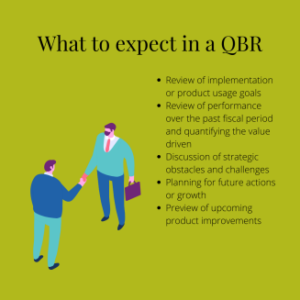
A QBR is a quarterly touchpoint for a business to get together with its client or customer. During these meetings, a business will typically review the impact their product or service had on their customer’s business. It’s also the perfect opportunity to discuss a customer’s future goals and how they can work together to achieve those goals. 

What to expect

Sure, Archie loves building and buying apps. But when it comes to protected IT services? It’s not exactly his passion. 

Using a managed IT service provider allows Archie to focus on what he does best. And by utilizing quarterly reviews with his IT service provider, he can feel confident about the steps they take to protect his company. 

At the most basic level, this is what Archie can expect when he meets with his provider each quarter:

  • Review of implementation or product usage goals 
  • Review of performance over the past fiscal period and quantifying the value-driven
  • Discussion of strategic obstacles and challenges
  • Planning for future actions or growth 
  • Preview of upcoming product improvements 

IT QBR

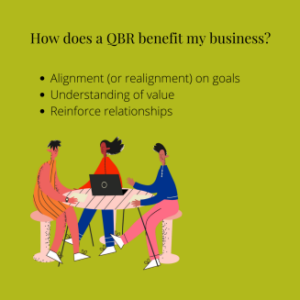
What are the benefits? 

For Archie, the most important benefit of a QBR is ensuring that both parties are aligned when it comes to upcoming goals for Archie’s App World. Walking through these goals allows Archie’s IT provider to draft a plan of action on how they will assist in achieving these goals. And, as an app designer, Archie is all about the small details!

Archie considers himself a pretty calculated guy. He’s never going to spend money on something without understanding the full value of that product or service. So when he does meet with his IT provider each quarter, they always make sure to recap exactly how much value Archie’s App World receives from their services.

Lastly, Archie loves the relationship-building aspect of these meetings. He may spend his days buried in his tech work, but that doesn’t mean he’s not up for a tasty dinner with clients to end a day of meetings!

IT QBR

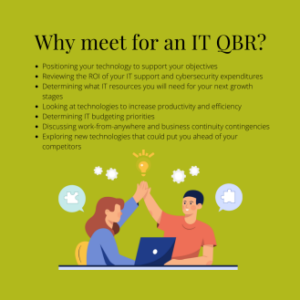
Why meet for an IT QBR? 

Executive IT consultants act as Archie’s vCIO, meeting with him to better understand Archie’s App World, its objectives, and next action steps. Because almost everything Archie does to grow his business is tied to the capabilities and cost of technology, the IT QBR is an essential quarterly meeting. 

Archie views his managed IT service provider as more than his IT support team. They provide Archie with the technology side of business consulting, so he can take Archie’s App World to the next level without IT roadblocks or speed bumps. In other words, they’re more like a business partner; getting on the same page as Archie and tackling the same goals. 

An IT QBR is essential for the following: 

  • Positioning your technology to support your objectives 
  • Reviewing the ROI of your IT support and cybersecurity expenditures
  • Determining what IT resources you will need for your next growth stages
  • Looking at technologies to increase productivity and efficiency 
  • Determining IT budgeting priorities 
  • Discussing work-from-anywhere and business continuity contingencies
  • Exploring new technologies that could put you ahead of your competitors

IT QBR

It’s worth making time for an IT QBR 

The ongoing realignment of your technology to your quarterly objectives and long-term strategy is critical to the pursuit of those goals. 

Keep yourself on target with a regularly-scheduled IT QBR — and, like Archie, watch your business thrive!

How does network continuity benefit your business?

What Is Network Continuity and Why Does It Matter?

Computer networks now serve as the virtualized backbone for businesses around the world.

And it makes sense.

After all, these networks provide us with instant access to information, streamlined communication between computers within the network, and the ability to simultaneously work on a single file with others. Talk about increased efficiency and productivity.

But relying on this heavily-linked infrastructure comes with big risks — like external hacks or threats of malware. It’s imperative that you have a solid disaster recovery plan to safeguard you from any corruption that could take place within your network. Along with this contingency plan comes network continuity, the most effective way to implement a solid backup system for your network.

What is network continuity?

Network continuity ensures that you always have access to internet connection. This guarantees a seamless, uninterrupted network operation with fully integrated 4G LTE failover and failback.

Network continuity also provides continuous access to cloud management, WiFi roaming, self-healing capabilities, hardened security, and built-in safeguards designed to ensure maximum uptime.

How does network continuity benefit your business?

No matter the kind of business you run or the products you sell, any kind of internet downtime can and will affect you.

Network continuity is a guaranteed way to prevent loss of sales and customers — and simultaneously assists with your disaster recovery plan.

Typically, backup systems work and save information in realtime. Without network continuity, backups are impossible when internet service is down.

When a network goes down, your business goes with it. Whether it be for hours or days, a network crash will drastically — and negatively — affect your company. A strong disaster recovery plan can save revenue and clients that may have otherwise been lost. Network continuity protects your business from threats and ensures your network is prepared to handle any situation.